Find answers from approved information
Create a knowledge search tool for policies, guides, product information, or internal documents. Staff can get a useful answer and see where it came from.
Best for teams answering the same questions every day.
AI Solutions and Automations
Vonix Soft designs practical AI workflows around a clear business job, approved information, existing systems, and human review. Start with one useful first release, then improve what proves valuable.
Where AI can help
The best starting point is not a broad AI transformation promise. It is a workflow your team already understands, with a practical problem to solve and people accountable for the result.
What we can build
You do not need to start with a complex AI product. Start with one part of the work that people repeat, search for, check, or hand over.
Create a knowledge search tool for policies, guides, product information, or internal documents. Staff can get a useful answer and see where it came from.
Best for teams answering the same questions every day.
Sort incoming files, pull out key details, flag missing information, and prepare a summary for the person who needs to review it.
Best for document-heavy intake, operations, and support work.
Use AI to prepare updates, route a request, summarize a case, or show the next step in a repeatable workflow without taking ownership away from the team.
Best for slow handoffs between people and systems.
Create an assistant for a defined job. It can search, draft, classify, or take a limited action when the right permissions, checks, and approval steps are in place.
Best for a focused task with a clear owner and review point.
Connect a useful AI feature to selected business systems, data, and screens so people do not need to leave the tools where the work already happens.
Best for improving a working system without replacing it.
Technology context
Examples of technologies we can assess for the right workflow. The final choice depends on the job, your systems, data, budget, and approval requirements. Logos identify the technology only and do not imply partnership or endorsement.
 Anthropic
 n8n
n8n Supabase
 React
ReactIndustry examples
The same AI pattern can help different teams. It starts with the specific information, handoff, or repeated task that slows that team down.
Explore industriesJob updates, document checks, customer status, and exception handoffs.
Product and policy search, order exceptions, returns, and support handoffs.
Client intake, document review, approved knowledge, and delivery updates.
Scheduling, intake, reminders, and administrative communication with review.
Workflow context
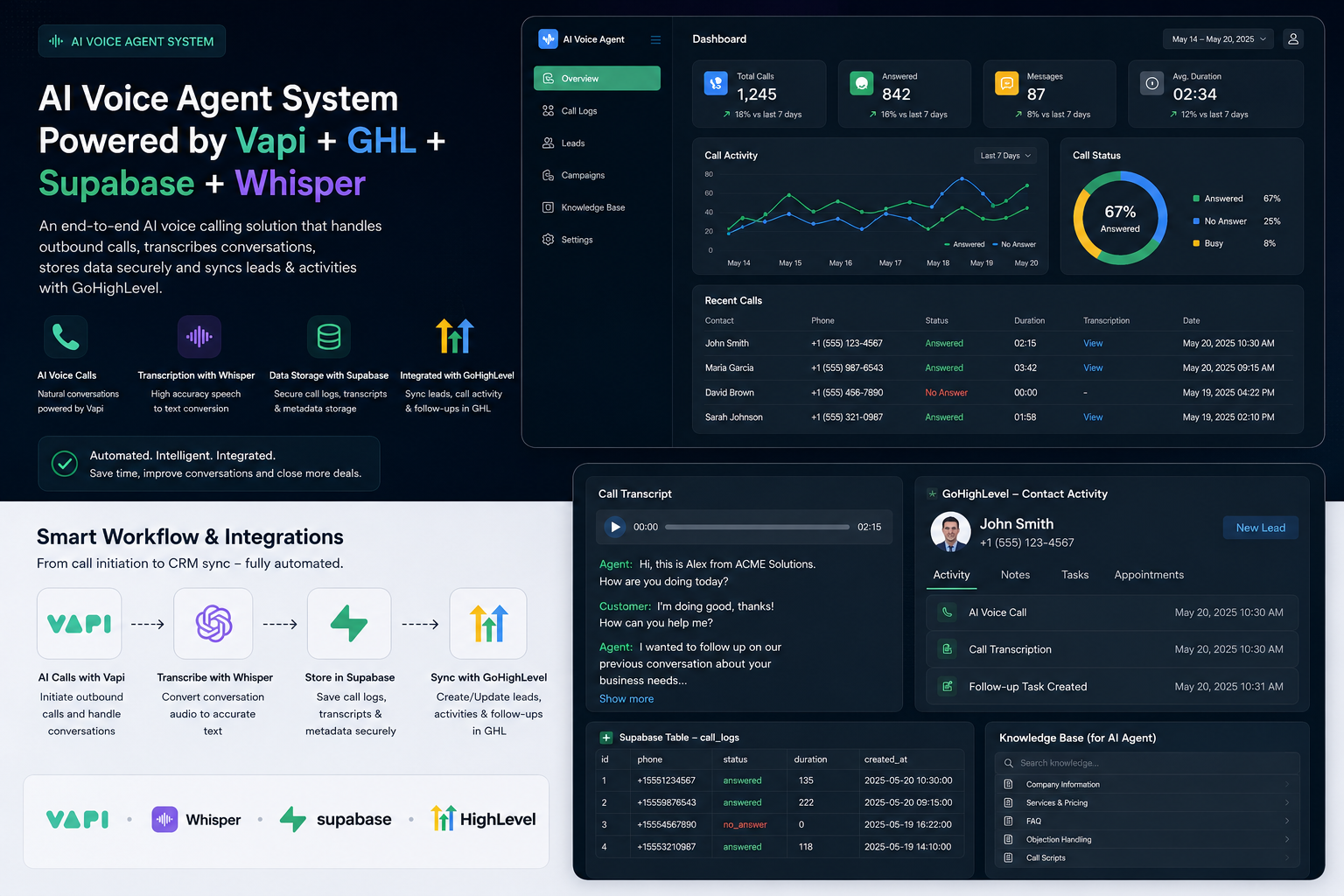
A useful release connects the AI feature to the place where people already work. That can be a dashboard, a knowledge base, a document queue, a CRM, or a customer-facing product.
We map the workflow before choosing the feature, model, or integration.
How a controlled release works
Identify one business workflow, the people involved, and the measure of usefulness.
Map approved sources, data ownership, permissions, existing systems, and the responsible owner.
Create a bounded workflow with human review for important actions or decisions.
Review outputs, feedback, usage, monitoring, and the next improvement before expanding the scope.
Controls and boundaries
Approved sources and clear data ownership
Role-based permissions for people and systems
Human review for important actions or decisions
Evaluation, feedback, monitoring, and support ownership
Domain-specific privacy, security, legal, or compliance review where needed
No clinical, legal, financial, fraud, hiring, or other high-impact automated decisions
Is AI a good fit?
AI usually works best when your team already knows the problem. You may have a large number of similar questions, a document-heavy process, or a task that needs the same information checked again and again.
It is usually not the right first move when the process is still unclear, the source information cannot be trusted, or nobody owns the result after it goes live.
Questions buyers ask
An AI workflow uses AI for one defined job inside a business process. For example, it may help staff find approved answers, sort incoming documents, prepare a summary, or identify the next handoff for review.
An AI assistant helps with a person’s task, such as searching information or preparing a draft. An agent workflow can take limited actions across systems, but it needs defined permissions, approval steps, monitoring, and a clear owner.
Start with a repeated question, document handoff, status check, or workflow bottleneck where the job, source information, and owner are clear.
Often, yes. We first confirm which systems, sources, permissions, and integration boundaries are appropriate for the agreed workflow.
Usually not. A useful first release can connect to selected systems or use approved copies of information. The goal is to improve one workflow without forcing a risky replacement of everything around it.
Bring the workflow you want to improve, examples of the information it uses, the systems involved, the people who own the work, and the point where a person should review the result.
The workflow should use approved information, role-based access, source links where useful, evaluation, and a feedback process for improving the output.
People should remain responsible for important actions, uncertain outputs, sensitive information, and decisions that affect customers, staff, or regulated work.
Agree the workflow measure before building, then review real usage, handoffs, exceptions, feedback, and the time or effort the workflow removes.
We do not position AI as the final decision-maker for clinical, hiring, legal, financial, fraud, or other high-impact decisions. Those uses need appropriate human responsibility and domain review.
Start with the workflow
We will help identify the most practical next step.