Vonix Soft Logo

Solution Study

Connecting Students, Teachers, Families, and School Systems Without Replacing the Stack

The student journey is shared, but the systems are not. A student may work in a learning platform, a teacher may record context elsewhere, a parent or guardian may use a portal or communication channel, and an administrator may need to review an exception in another workflow.

The proposed Connected K-12 Collaboration Layer preserves existing SIS, LMS, attendance, assessment and communication systems as the owners of their records. It connects the workflow around them through standards and APIs, identity and relationship mapping, event orchestration, role-specific views and staff-owned exception handling.

This is a research-backed Solution Study and proposed reference architecture. It is not a delivered Vonix Soft client case study or a claim about a school or district implementation.

K-12 educationK-12 interoperabilityPublished October 8, 2026By Mirza Abdul Rehman, AI Engineer
01

The K-12 collaboration problem

A school can have a modern SIS, LMS, communication platform, assessment system, attendance workflow and identity provider and still create a fragmented experience when the same student journey crosses several products without a reliable connection between them.

An absence illustrates the problem. The official attendance record may live in the SIS; a teacher may hold context; a guardian needs a timely notification and may respond with an explanation; staff may need to review it; and the official record still belongs in the SIS. The difficulty is coordinating the event across roles, systems and channels while preserving the correct source of truth.

02

Why it is an interoperability and workflow problem

Project Unicorn describes interoperability as secure exchange and use of data across applications and systems, including reducing manual imports, exports and data silos. 1EdTech OneRoster supports exchange of people, courses, enrollments, academic sessions and gradebook-related information, with SIS-to-LMS interoperability as a primary K-12 use case. Ed-Fi models student-centric relationships including enrollment, schedules, attendance, teachers and parent or guardian information.

These standards demonstrate that coordinated exchange across school systems is a real technical and operational concern. They do not define each institution's process ownership, permissions, exception paths, communications or user experience, which is why a connected workflow needs more than data synchronization.

03

Four roles, one student journey

Students may use an LMS, portal, mobile application or approved school communication channel. Teachers may update course activity, assignments, classroom information and selected student records. Parents or guardians may need notifications, explanations, a reply path or a clear next step. School staff and administrators own the exception path when information is missing, inconsistent or requires review.

The workflow must resolve authenticated identity, student-to-school relationships, teacher-to-class relationships, guardian-to-student relationships, staff role, school or district scope, permitted information and whether an action is informational or consequential. When handoffs are incomplete, people become the integration layer through manual checking, forwarding, re-entry, reconciliation and follow-up.
04

Existing standards and products

OneRoster, LTI, Ed-Fi, approved vendor APIs and webhooks can already solve part of an exchange. A school should use the simplest reliable integration mechanism that preserves ownership instead of duplicating a supported standard without a reason.

Existing products also solve substantial parts of the experience. Canvas Parent provides observers access to selected learning information depending on institutional configuration. ParentSquare and TalkingPoints provide school-family communication capabilities. If an installed platform already covers the required workflow, configuration or improvement may be more appropriate than custom development.

06

Proposed solution

The Connected K-12 Collaboration Layer is not a second SIS or LMS. It coordinates events across systems while authoritative records remain in the applications that own them. It uses interoperability mechanisms, identity and role mapping, event and workflow orchestration, role-specific views, an admin exception queue, audit and monitoring.

The central rule is: update once where the record belongs, then route the relevant event to the people who need it. The layer must not quietly become an unofficial source of truth for attendance, assignments, identity or family communication records.

05

Options and trade-offs

Buy or consolidate into an existing communication platform

When it fits: The core problem is family messaging, translation, forms, notifications or communication-channel fragmentation.

Trade-offs: May not coordinate every SIS, LMS, assessment, attendance and staff-exception workflow.

Use existing interoperability standards

When it fits: The required exchange is covered by OneRoster, LTI, Ed-Fi or another supported standard.

Trade-offs: Standards exchange defined information but do not define every end-to-end workflow.

Integrate existing products through a workflow layer

When it fits: The school wants to retain its platforms but needs one connected operational journey across them.

Trade-offs: Requires clear source ownership, role mapping, exception handling and support ownership.

Build a new all-in-one platform

When it fits: Requirements genuinely cannot be met through the current stack, configuration and integration.

Trade-offs: Replacing capable systems should require a clear operational and business case.

07

Proposed reference architecture

Reference architecture

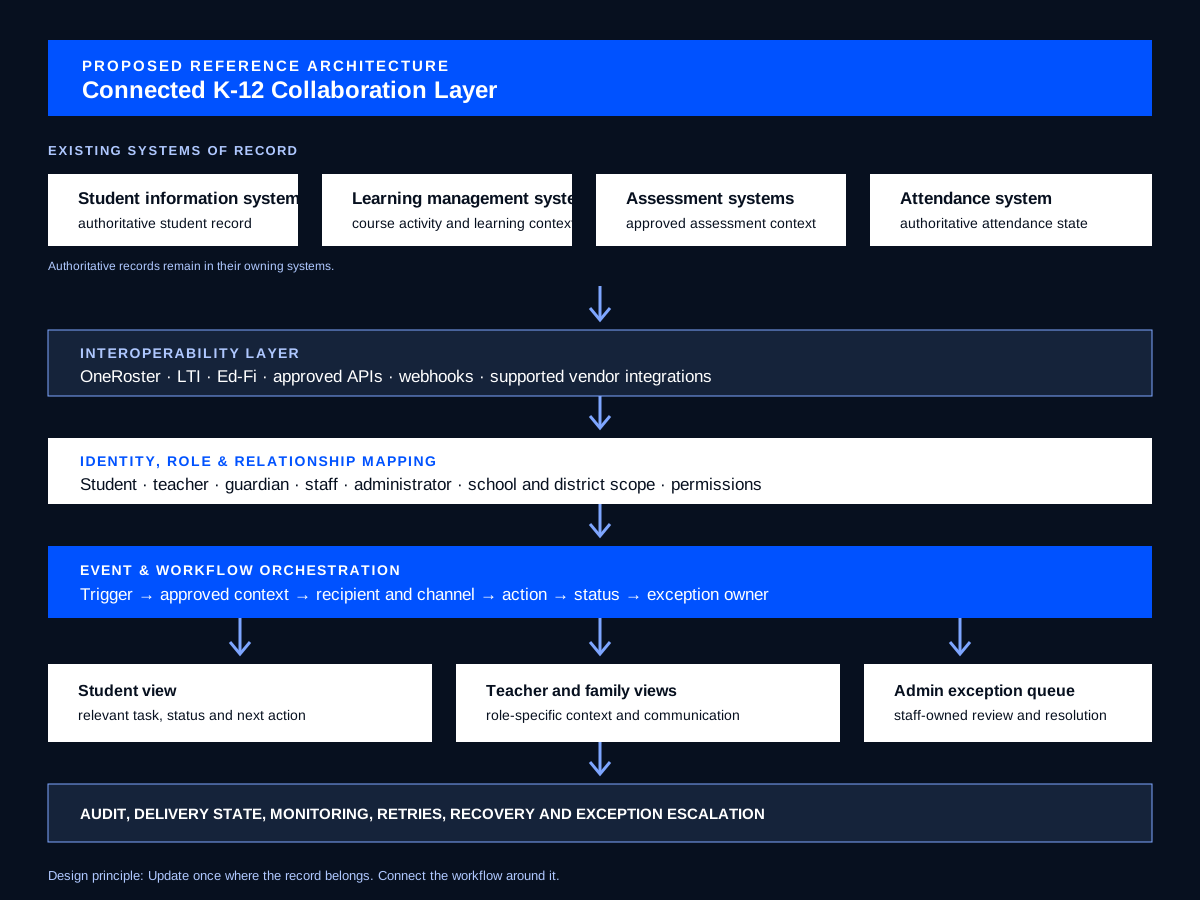
Events move through the workflow, while authoritative records remain in the existing systems that own them. The illustration is a proposed reference architecture, not a school or district implementation.

Proposed K-12 collaboration layer: SIS, LMS, assessment and attendance retain authority. Standards, APIs, identity mapping and orchestration support role-based views, exceptions, audit and monitoring.

01

Existing systems of record

SIS, LMS, assessment and attendance systems continue to own their respective authoritative records.

02

Interoperability layer

OneRoster, LTI, Ed-Fi, approved APIs, webhooks and supported integrations exchange the defined information.

03

Identity, roles and relationships

Student, teacher, guardian, staff and administrator relationships, scope and permissions are checked before the workflow proceeds.

04

Event and workflow orchestration

Turns a source event into a controlled next step with context, recipient, channel, status and exception owner.

05

Role-specific views

Student, teacher and family views expose only the relevant task, status, context and next action.

06

Admin exception queue

Makes mismatches, missing relationships, failed delivery and unresolved cases visible to accountable staff.

07

Audit and monitoring

Tracks delivery state, retries, recovery, escalation, integration health and workflow completion.

07

Where AI can help

AI may summarize a student-service or family communication thread, draft a clear family update, support translation or clarity where approved tools and review controls exist, classify an incoming family response, retrieve approved policy information, route a request and explain a next step in simpler language.

These are bounded assistance tasks inside an approved workflow. AI does not own authorization, source-system updates, attendance records or consequential educational decisions.

Thread summarizationFamily-update draftingApproved translation supportResponse classificationApproved-information retrievalRequest routingPlain-language explanation
08

Where AI should not decide

AI should not independently become the authority for official grades, attendance records, discipline decisions, safeguarding decisions, eligibility determinations, special-education decisions or other consequential student decisions. Authoritative records, deterministic rules, authorized staff and institutional policy remain explicit.

Permissions

Role and relationship checks must be enforced by the application and integrated systems. A workflow may need to verify authenticated identity, student, teacher and guardian relationships, staff role, school or district scope, permitted information and permitted actions. Least-privilege access is the default design principle.

Human review

Authorized staff and formal institutional workflows retain responsibility for discipline, safeguarding, eligibility, special education, consequential attendance decisions and other high-impact student matters. Low-confidence or consequential family responses route to staff.

Exceptions

Represent SIS or LMS disagreement, stale synchronization, missing guardian data, duplicate identities, failed delivery, API or vendor outage, changed permissions, ambiguous responses and unresolved exceptions as explicit states with a named owner, status, retry or recovery behavior and next action.

09

Implementation approach

Start with a system map: installed SIS, LMS, communication, attendance, assessment, identity and portal tools; their systems of record; standards and APIs; roles and permissions; current workflow; exceptions; and existing capabilities. Select one cross-role journey that is frequent enough to matter but bounded enough to implement and evaluate.

For a first release, an attendance-exception communication workflow can connect an SIS attendance event to an approved family notification, two-way response, staff review, authorized SIS update and status confirmation. Expand only after source ownership, role mapping, delivery state, exception handling and support ownership are stable.

  1. 01

    Phase 0: discovery and system map

    Document installed systems, systems of record, standards and APIs, workflows, roles, permissions, exceptions and existing capabilities.

  2. 02

    Phase 1: select one workflow

    Choose one bounded student-family-school journey with a clear source of truth and measurable completion state.

  3. 03

    Phase 2: prefer existing capabilities

    Check SIS, LMS, communication-platform features, OneRoster, LTI, Ed-Fi and supported integrations before custom development.

  4. 04

    Phase 3: build missing orchestration

    Implement only required connectors, role mapping, event handling, routing, status, exception queue, audit and monitoring.

  5. 05

    Phase 4: add bounded AI assistance

    Independently evaluate defined AI tasks such as drafting, classification, translation support, retrieval or routing.

  6. 06

    Phase 5: conditional expansion

    Add journeys only after the first workflow is stable and verified operational need justifies further scope.

10

Risks and limitations

A school may already own a platform that can solve the target workflow through configuration. Desired workflows can also be constrained by vendor APIs, event support, licensing or data-access policies. Guardian relationships, shared custody, student moves, staff changes, substitutes and school boundaries make identity mapping non-trivial.

This proposed reference architecture does not establish legal or regulatory compliance, claim a delivered Vonix Soft K-12 implementation, or promise attendance, engagement, teacher-efficiency, cost, ROI or student-outcome improvement. Public standards, public-sector guidance and vendor documentation do not prove every institution has the same stack or workflow problem.

11

Decision checklist

What exact student journey are we improving? Which roles participate? Which system owns the authoritative record? What do the existing SIS, LMS or communication platform already solve? Can OneRoster, LTI, Ed-Fi or a supported integration cover the exchange? How are student, teacher, guardian, staff and administrator relationships verified? What happens when a source is stale, unavailable or inconsistent? Who owns the exception? What remains deterministic or human-controlled?

12

Conclusion

K-12 collaboration does not become connected merely because each participant has access to software. Preserve systems that own records, use standards and vendor integrations where they fit, connect the remaining workflow, verify identities and roles, make exceptions visible, and use AI only for bounded assistance. The goal is not one new platform. It is one connected student journey.

Sources

  1. 01What is Interoperability?

    Project Unicorn · Interoperability context, manual data movement and data-silo boundaries.

  2. 02OneRoster 1.2 Standard

    1EdTech · K-12 roster, enrollment, course and gradebook-related exchange context.

  3. 03OneRoster Planning and Procurement Guide

    1EdTech · Manual maintenance and point-to-point integration context.

  4. 04Data Standard

    Ed-Fi · Student-centric model including enrollment, attendance, teachers and guardians.

  5. 05Data Standards

    Ed-Fi · Additional Ed-Fi standards documentation linked in the source study.

  6. 06Family Partnership and Engagement

    U.S. Department of Education · Family partnership and two-way communication context.

  7. 07Increasing Family Engagement in Distance Learning Classrooms

    Institute of Education Sciences · Family-engagement context in the supplied study.

  8. 08What is the Canvas Parent app?

    Instructure · Vendor-attributed observer access and learning-information context.

  9. 09Families and Students

    ParentSquare · Vendor-attributed school-family communication context.

  10. 10Partner Network

    ParentSquare · Vendor-attributed integration context.

  11. 11TalkingPoints FAQ

    TalkingPoints · Vendor-attributed multilingual two-way school-family communication context.

Related

Related resources

Layered white panels rising in even rows against a pale sky.

Photo by Tato Lopez on Unsplash

Solution Study

What Should AI Trust in Higher Education?

Higher-education AI can retrieve policies, answer questions, and assist with student-service work, but reliable operation depends on knowing which source is authoritative, what data must be read live, who may see it, and which actions require institutional approval.

Research-backed studyRead study
AI Solutions and AutomationsCustom Software DevelopmentCloud and DevOpsBusiness SystemsIntegration SolutionsAI and Automation Solutions

Next step

Discuss the system, ownership and decision boundary behind the problem.

Discuss your system architecture